Mac & PC Adobe After Effects plugin (2022+ or newer)

Automate the
process.

RECLAIM TIME.

An automated script for rendering single frames, including formats with transparency (Alpha). Drop revisions from CSV files, burn watermarks, and stop wasting hours on manual exports in After Effects.

⚡ Extremely lightweight script (under 160KB) – zero RAM overhead.

Experience the engine

Start with the free version. Save hours of manual clicking completely risk-free.

FrameWise UI
0

Title

Description goes here.

⚡
15-60 min
REAL TIME SAVED PER PROJECT
∞ Batch Export up to 21 Frames 💻 Cross-Platform (Mac & Win) 🛡️ Watermark Protection 💎 Pristine Quality & Alpha Channel 🔄 Live CSV Auto-Refresh 🧠 Smart Duplicate Detection ⚙️ Dynamic Auto-Naming
∞ Batch Export up to 21 Frames 💻 Cross-Platform (Mac & Win) 🛡️ Watermark Protection 💎 Pristine Quality & Alpha Channel 🔄 Live CSV Auto-Refresh 🧠 Smart Duplicate Detection ⚙ Dynamic Auto-Naming

Why upgrade to PRO?

The True Game-Changer

∞

Batch Export 21 Frames

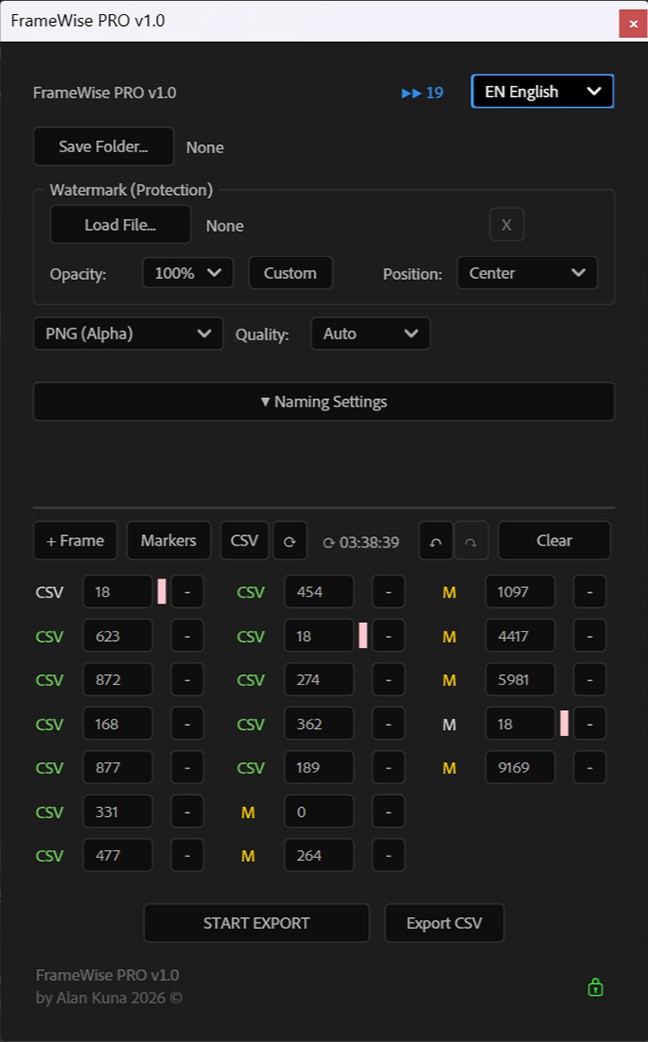
Forget rendering shots one by one. Pick your key moments (from the timeline, markers, or a CSV file) and export the entire batch in a split second, with zero risk of crashing AE!

💎

Pristine Quality & Alpha

Unlock what matters most. Export flawlessly clean PNGs with full transparency (Alpha) or lightweight JPGs. Choose your target quality (Full, Half, Quarter) straight from the UI.

🛡

Watermark Protection

Sending previews before the invoice is paid? Protect yourself automatically! The plugin overlays your custom logo (PNG/JPG) on every exported frame with full opacity control.

⌨️

Keyboard-First Navigation

A tool for professionals must keep up with your fingers. The script is highly optimized for keyboard navigation. Trigger key functions without taking your hands off the keyboard.

No-Mouse Workflow
🔄

Live CSV Auto-Refresh

Working off a spreadsheet with client feedback? FrameWise instantly imports frame numbers straight into your render queue. If the client updates the file, one click syncs everything in AE. We currently support cell number imports, and upcoming free updates will bring full support for timecodes and direct text comments!

Excel Workflow Ready
Alan Kuna

👋 Alan Kuna

Creator & Systems Specialist

⚙️

Dynamic Auto-Naming

Keep your folders perfectly organized without typing a single letter. Build your own naming template using smart tags: [compName] (composition name), [frame] (frame number), [res] (resolution), and [date] (current date).

Example: [date]_[compName]_[frame].png → 2026-08-08_MainSequence_00145.png
🧠

Smart Duplicate Detection

If a frame number repeats in your queue, FrameWise instantly highlights it and prevents double-exporting. Zero wasted resources!

🤖

Build Your Own Batch AI Upscaler

Monetize Your Workflow

Need to upscale hundreds of photos without paying for AI tokens in external apps? Drop your images on the After Effects timeline, apply the native 'Detail-preserving Upscale' effect, and run FrameWise. The script will export pristine files by driving an infinite upscaling queue (currently 21 frames with 1 click ∞). Important: FrameWise is a pure automation engine, not an AI model – you burn absolutely ZERO external API credits!

Hard Math

Calculate your ROI

Calculate the hidden cost of manual rendering. Adjust the sliders to match your real workflow.

20 min
75 $/h
ROI

Monthly savings

7.0 hours

Your hidden cost

525 $

License ($89) pays for itself in 4 days.

* Estimate based on your inputs, assuming 21 working days per month.

Studio pipeline investment

One-time fee. Zero hidden subscriptions. Optimize your workflow once and for all.

FrameWise FREE

/ Hobbyist
  • ✕ CSV / Markers limited to 3 per batch export
  • ✕ No NDA protection (Watermarks)
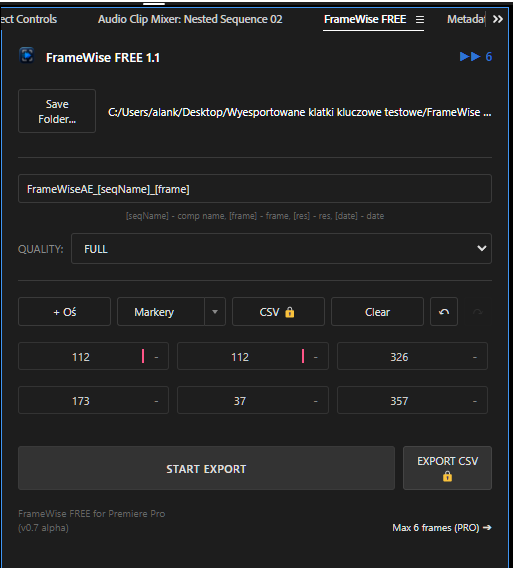
  • ! Max 4 frames per render
  • ! Max 15 queue exports per AE session
Download FREE Engine

* Placeholder

PRO

Lifetime PRO License

/ 1 Seat
Special -29% OFF Offer
Ends in (Oct 30, 2026): 00:00:00:00
YOUR DISCOUNT CODE:
  • ∞ No limit CSV/Markers in Pro Version
  • ✓ Advanced NDA protection module
  • ∞ Export 21 frames in one click ∞
  • ∞ Unlimited engine execution
  • ✓ Single-seat license per workstation
  • ✓ 2-year technical support and updates for version 1.x.x.
  • 🛡 7-Day Technical Guarantee OR MONEY BACK*
Buy PRO License

* Plus applicable tax/VAT. Automatic B2B invoice.
The exact final amount will be securely calculated and displayed at checkout before you complete the payment. No hidden fees.Local prices based on ~$1 = 3.87 PLN rate

For Teams

Studio PRO License

/ 3 Seats
Special -29% OFF Offer
Ends in (Oct 30, 2026): 00:00:00:00
YOUR DISCOUNT CODE:
  • ✓ All PRO features included
  • ✓ 3 workstations (easy management)
  • ∞ Option to purchase unlimited licenses for your team
  • ✓ 2-year priority technical support (with extension option)
  • i Ideal for small teams and studios. Standardize your workflow. Contact via 'Request Studio Package' below.

* Plus applicable tax/VAT. Automatic B2B invoice.
The exact final amount will be securely calculated and displayed at checkout before you complete the payment. No hidden fees.Local prices based on ~$1 = 3.87 PLN rate

Technical Frequently Asked Questions

What exactly is FrameWise PRO and what is it used for? +

FrameWise PRO is an advanced rendering engine and your dedicated robot integrated directly into After Effects. It’s a powerful system automating repetitive work, built for professional studios and high-end freelancers. Instead of wasting hours manually scrubbing timelines, naming files, and exporting previews, you load a CSV sheet, and FrameWise flawlessly extracts the frames, secures them with an NDA watermark, and delivers production-ready files. Enterprise-class pipeline tools often cost hundreds of dollars a month – FrameWise PRO eliminates your workflow bottlenecks for a fraction of that, paying for itself on your very first major project.

Can I use it for free? +

We give the basic engine (without CSV support and with session limits) to the community completely for free. The PRO version is an investment tool for professionals and studios, unlocking unlimited potential and mass data import.

Is this a subscription hidden behind a 'one-time' fee? +

Absolutely not. We hate hidden costs. You buy the tool once (Lifetime License) and use it forever within the purchased major version. Additionally, you receive free stability updates within the v1.x branch.

🛑 Wait, is FrameWise an AI generator? Does it use API credits? +

No. FrameWise is an automation engine, not an artificial intelligence model. When we suggest 'Batch AI Upscaling', we are merely presenting a workflow technique utilizing After Effects' native 'Detail-preserving Upscale' effect. FrameWise automates the export process (clicking 'Export' for you), but the image processing itself is handled by Adobe's engine. The quality and performance of built-in program effects are not dependent on the FrameWise author.

Does the script require a constant internet connection? +

No! For daily rendering, you do not need to be constantly online. The script requires a network connection only during initial activation, when transferring a license to another device, and occasionally (at random, infrequent intervals) to verify the validity of your anti-piracy key and protect against abuse. Most of the time, you can work completely offline!

Why the specific 4-frame limit in the FREE version? +

Let's be completely honest. The software engineering cost and hundreds of hours required to build such an advanced system are substantial. The 4-frame limit lets you fully test the engine for free, but as a commercial product, we simply encourage professionals to buy the PRO version to support ongoing development.

I'm changing jobs/computers. What about my license? +

Your license is tied to a unique Hardware ID, but it's not a prisoner of your machine. Please keep in mind that you can only be logged into one device at a time. You just click 'Deactivate License' in the panel to release the key, and 10 seconds later you can activate it on your new macOS or Windows hardware.

The script fails to export frames (Cannot save PNG error). +

This is a common issue! Your operating system (especially macOS Sonoma and Windows 11) can be overprotective and block script disk access. To easily fix this, ensure 'Allow Scripts to Write Files and Access Network' is checked in your After Effects preferences (Edit -> Preferences -> Scripting). We also highly recommend pointing your renders to local folders (like your Desktop) instead of cloud-synced directories.

What do the colored indicator bars (salmon and gray) mean? +

That's our intelligent feedback system. If the script detects a duplicate frame request, it highlights it salmon-pink and skips it during rendering to save time. A dark-gray bar is an Out-of-Bounds frame (lying outside the composition duration), blocked to prevent software errors.

How does the 7-Day Technical Guarantee OR MONEY BACK* work? +

We understand the hesitation when introducing a new tool, which is why we offer a 7-Day Technical Startup Guarantee for installation and key activation after purchase. A money-back refund will be issued **only if** our documentation and designated support technician are unable to successfully activate the software on your device due to technical or compatibility issues. To process the claim and allow us to help fix the program, you must have internet access. If we ultimately cannot get it running, you will receive a 100% full refund. Exercising this refund option results in the immediate removal of your PRO license access (even during temporary offline moments), though you may continue using the limited FrameWise FREE version. To avoid 'change of mind' requests, we strongly encourage testing the FREE version first. An active Adobe After Effects license is required.